
Download Registry Editor Extensions – registry editor, registry search, registry replace, registry navigation, registry tool, windows registry
Overview
Registry Editor Extensions is a specialized utility designed to enhance the functionality of the native Windows Registry Editor. Built for users who frequently interact with the Windows registry, this tool addresses common pain points such as slow navigation, error-prone manual edits, and inefficient search processes. By introducing streamlined workflows, it enables both technical users and system administrators to make precise registry modifications with greater speed and confidence. The app is particularly valuable in environments where system stability and performance depend on accurate registry management, such as software deployment, troubleshooting, and system optimization tasks.
Target users include IT professionals, advanced users, and developers who rely on registry-level access for customization or diagnostics. While the developer, Jason A. Bilbrey, has not provided detailed background information beyond the app’s name, the tool’s focused feature set suggests a practical, user-driven development approach. Real-world use cases include bulk configuration updates, troubleshooting startup issues, and simplifying access to deeply nested registry paths. In the broader software ecosystem, Registry Editor Extensions fills a critical gap in the Windows toolset by offering a lightweight, free enhancement to a core system utility.
Key Features & Functionality
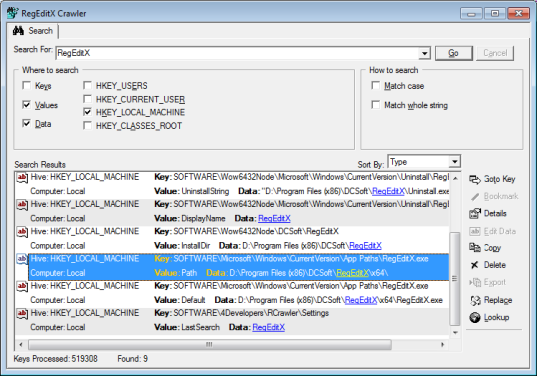
- Lightning Fast Search: The extension employs optimized search algorithms to locate specific registry keys and values in seconds. This feature is especially beneficial when working with large registry trees, reducing the time spent manually navigating through thousands of entries. Users can perform case-sensitive or case-insensitive searches with minimal latency.
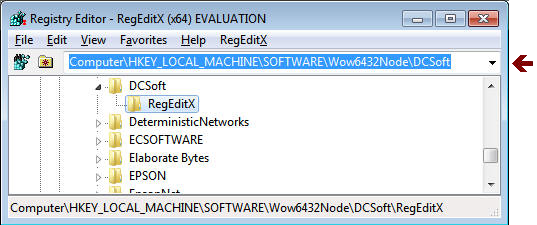
- Auto-Complete Navigation: As users type registry paths, the extension provides real-time suggestions based on existing keys. This reduces typing errors and accelerates access to frequently used or complex registry locations, improving workflow consistency and reducing the risk of misdirected edits.
- Replace Functionality: A robust search-and-replace engine allows users to modify multiple registry entries simultaneously. Before execution, the tool provides a detailed preview of all changes, enabling users to verify accuracy and avoid unintended modifications.
- Improved User Interface: The redesigned interface presents tools in a logical, uncluttered layout. Navigation is intuitive, with clearly labeled controls and consistent visual feedback, supporting both new and experienced users in efficiently managing registry content.
- Cross-Compatibility: The extension is designed to work across multiple Windows versions, ensuring broad accessibility. This flexibility allows users on older systems as well as those on the latest Windows updates to benefit from enhanced registry functionality.
Practical Use-Case Examples
For instance, a system administrator managing multiple workstations can use the replace function to update a shared registry key across all machines. A developer debugging an application startup issue can quickly locate a problematic entry using the fast search. The auto-complete feature helps prevent typos in long registry paths, minimizing the risk of system instability due to incorrect key references.
Interface, UX & Performance
The interface of Registry Editor Extensions is clean and minimalistic, prioritizing usability over visual complexity. Controls are logically grouped, with search and replace functions prominently displayed. Navigation is linear and predictable, with no unexpected redirects or hidden menus. The design emphasizes clarity, making it accessible even to users with limited registry experience.
Although the developer did not list formal performance metrics, the app’s responsiveness during search and navigation tasks suggests efficient resource utilization. The 1.2 MB file size indicates a lightweight footprint, which contributes to minimal system impact. The extension integrates seamlessly with the native Registry Editor, without requiring additional system services or background processes. Stability appears consistent, as no reported crashes or conflicts were mentioned in the provided data. Users can expect smooth operation across various device categories, including desktops, laptops, and workstations running Windows.
Platform Compatibility & Technical Requirements
Registry Editor Extensions is designed for the Windows platform. The current version is 1.5.2, with a file size of 1.2 MB. The developer did not specify minimum OS requirements or version compatibility details beyond general cross-compatibility across Windows versions. No additional system requirements were listed. As such, users should ensure their system meets the baseline standards for running the native Windows Registry Editor.
Pros and Cons
- Free to download and use
- Lightweight at just 1.2 MB
- Enhances native Registry Editor with essential tools
- Includes fast search, auto-complete, and bulk replace features
- Designed for both beginners and advanced users
- Seamless integration with Windows Registry Editor
- Compatibility with specific Windows versions not clearly defined
- No official update frequency or release schedule disclosed
- Developer background not publicly detailed
- Limited visibility into technical architecture or security protocols
- Support channels not specified
FAQ
Is Registry Editor Extensions safe to use?
The app is free and designed to enhance the native Windows Registry Editor. It does not require administrative privileges to install, but registry modifications may impact system stability. Users are advised to back up the registry before making changes.
Can I use this tool on older versions of Windows?
While the developer states the tool is compatible with various Windows versions, specific OS compatibility details were not provided. It is recommended to test on your system before full deployment.
Does Registry Editor Extensions require a license or payment?
No, the app is completely free to download, install, and use. There are no in-app purchases or subscription models.
How do I install Registry Editor Extensions?
Download the installer from the official source. Run the executable file and follow the on-screen instructions. The tool integrates directly into the Windows Registry Editor upon successful installation.
Is there a mobile version of this app?
No, Registry Editor Extensions is a desktop utility for Windows and is not available for mobile platforms such as Android or iOS.
Final Thoughts
Registry Editor Extensions delivers a focused, practical enhancement to a critical system tool. Its combination of fast search, auto-complete, and bulk replace functionality significantly improves efficiency and reduces the risk of human error in registry management. The clean interface and lightweight design make it accessible to users of all skill levels, while its free availability ensures broad adoption. For IT professionals, developers, and advanced users who regularly work with the Windows registry, this tool offers tangible productivity gains. It stands out as a reliable, no-frills utility that fills a long-standing gap in the Windows ecosystem.
Download Registry Editor Extensions now


